
Until Dally is listed in Claude’s connector directory, you add it as a custom
connector. Claude supports custom connectors on Free, Pro, Max, Team and
Enterprise plans. A Free account can have one custom connector.
1. Create your Dally account
Open dally.ai and select Get started. Sign up with your email, then choose Claude on the Add Dally to ChatGPT or Claude screen. That screen runs the same steps as this page and moves on by itself when Claude connects. You do not need to connect Instagram first; Dally asks for it after you say hello.2. Add Dally to Claude
Use a computer, or a phone’s browser. On a phone, sign in to claude.ai in Safari or Chrome first: the Claude app cannot add a connector yet. Once Dally is added on the web, the same Claude account can use it in the app too.1
Open the add link
Select Open apps on your Dally setup screen, or open Add Dally to Claude.Claude opens Add custom connector with the name Dally and the URL 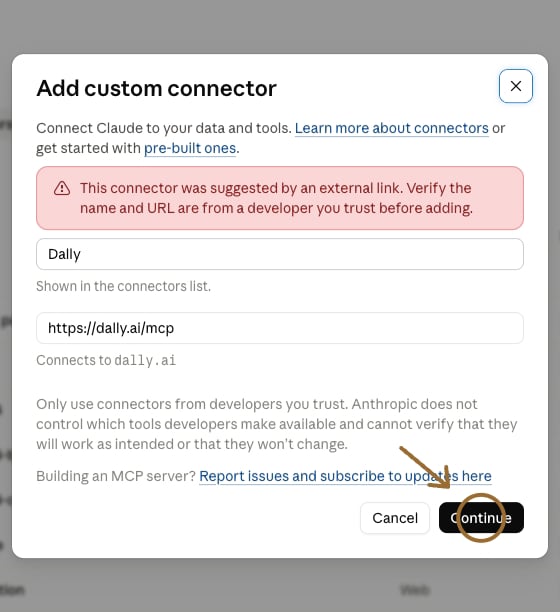
https://dally.ai/mcp already filled in. Claude notes that an external link suggested them. Check both, then select Continue.2
Leave the default settings and select Add
Claude shows how it will sign in to Dally, with Use Claude’s published identity already chosen and marked Detected. Leave everything as it is: Dally needs no client ID, no client secret and no request headers. Scroll to the bottom and select Add.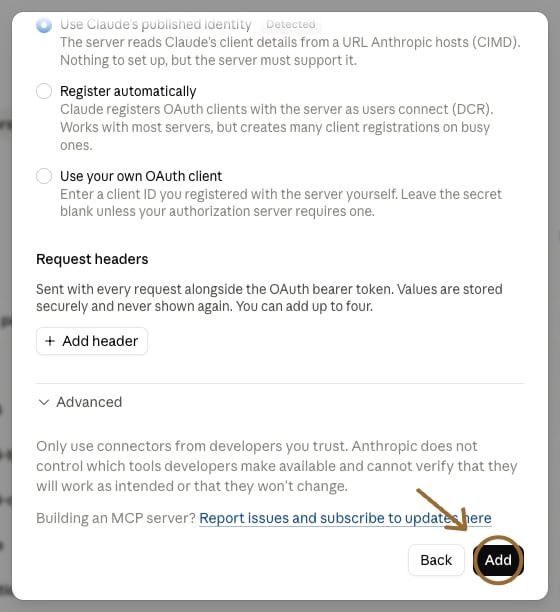
3
Select Connect
Claude opens Dally’s connector page, which says You’re not connected to Dally yet. Select Connect.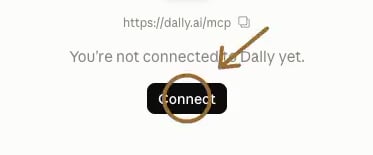
4
Sign in to Dally
A Dally sign-in page opens. Sign in with the same email you used in step 1. A Cloudflare “verify you are human” box can appear once; tick it.Claude returns to the connector page, and Dally now shows as connected. Your Dally setup screen notices within a few seconds and moves to Say hello.
3. Say hello
Select Try in Claude on your Dally setup screen, or open a new chat with the message filled in, and send it:What to ask
Each of these opens a new Claude chat with the question filled in.- What should I make next? “Using Dally, based on content I’ve made and what’s working for others, what should I make next?”
- Ideas in my voice. “Using Dally, give me five post ideas that reuse my own past stories and formats, not someone else’s.”
- What’s working in my niche. “Using Dally, show me the top reels in my niche from the last 90 days and the hooks they open with.”
- What’s working for me. “Using Dally, which of my posts performed best this year, and what do they have in common?”
- How did my last post do? “Using Dally, look at my most recent post and tell me how it did against my average, and why.”
Team and Enterprise accounts
On a Team or Enterprise plan, an Owner or Primary Owner adds Dally to the organization first. Members then connect their own Dally accounts.Owner steps
- Open Organization settings → Connectors.
- Select Add.
- Point to Custom, then select Web.
- Enter Dally for the name, and paste this URL:
- Leave the default settings, then select Add.
Member steps
- Open Customize → Connectors.
- Find Dally. It can have a Custom label.
- Select Connect, then sign in to your Dally account.
- Say hello, as in step 3 above.
Keep Dally up to date
Claude keeps the list of Dally’s tools it read when you connected. When Dally says it has a new version, one press picks it up: refresh Dally in Claude.If something looks wrong
Still stuck? Write to support@dally.ai or see dally.ai/support.